When I upgraded to Snow Leopard 10.6, I thought I had lost the ability to display picture RSS feeds as a screensaver. I even posted in the apple forums with no answer. Turns out Apple just changed how you do it.
To set it up, go to System Preferences, Desktop & Screen Saver. Under the list of available screen savers, click the plus icon and select “add RSS feed”.
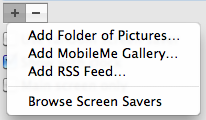
Paste in your RSS feed and click OK.
The pictures at that RSS feed should now show up as your screen saver (provided you gave a valid picture RSS feed).
NOTE: I have had a few problems with this process. Sometimes when you paste the RSS feed in, and click ok, it gets stuck validating the feed. I tried again, and it worked, so I’m not really sure what the problem is.
Pingback: Snow Leopardã®Screen Saver㧔Mobile Me 㨠RSS”ã¯ï¼Ÿ « xaborger
Awesome. I thought it was gone.